Two weeks is an awkward length for a photography trip. A weekend lets you throw one camera and a spare battery into a daypack and forget about it. A month abroad justifies the big roller case and the tripod you rarely use. Fourteen days sits in between, and it is exactly long enough for something to fail — a card to corrupt, a charger to die in a hotel socket, a lens to take on sand at the beach. Pack for redundancy, but pack light enough that you still enjoy carrying the bag on day eleven.
What follows is the checklist I build from before every long trip. Not a wish list of gear, but a working list of what has to be in the bag, what has to be in the room, and what stays at home.
Start With the Body, and One Backup
One main camera, one backup. The backup does not have to be another interchangeable-lens body. A good compact or the phone in your pocket counts, as long as you know how to use it well and it can shoot raw if that matters to your workflow. What you are protecting against is not a broken sensor — it is the small, stupid failures: a shutter that jams, a camera dropped on cobblestones, a battery door that will not latch anymore.
If you own two bodies and are tempted to bring both, ask yourself which one you would genuinely shoot with on a given day. If the answer is "always the same one," leave the other at home and put the weight into a better lens or a second card wallet. Two bodies only make sense when you shoot events, when you need a long lens and a wide lens instantly, or when the second body is small enough to live in a jacket pocket.
Small things people forget on the body
- Body cap and rear lens caps, at least one spare of each
- Spare battery door or port covers if your camera has fragile ones
- A strap you have actually walked ten kilometres with
- Small tripod plate or L-bracket, if your tripod needs one
Lenses: Two Good Ones Beat Five
The classic mistake is packing for every photograph you might take. You will not take most of them. For two weeks, three lenses is generous and two is often ideal: a standard zoom as the workhorse, and a fast prime for evenings, interiors and portraits. A compact telephoto zoom earns its place on wildlife or mountain trips, and on almost nothing else.
Concretely: a 24–70mm equivalent, a 35mm or 50mm at f/1.8 or faster, and then decide whether the third slot is a telephoto or a second prime. Bring one set of filters sized for your largest lens plus step-up rings, rather than three sets of circular polarisers. Take the lens hoods — they protect the front element better than any UV filter and cost nothing in weight.
A quick way to test your kit
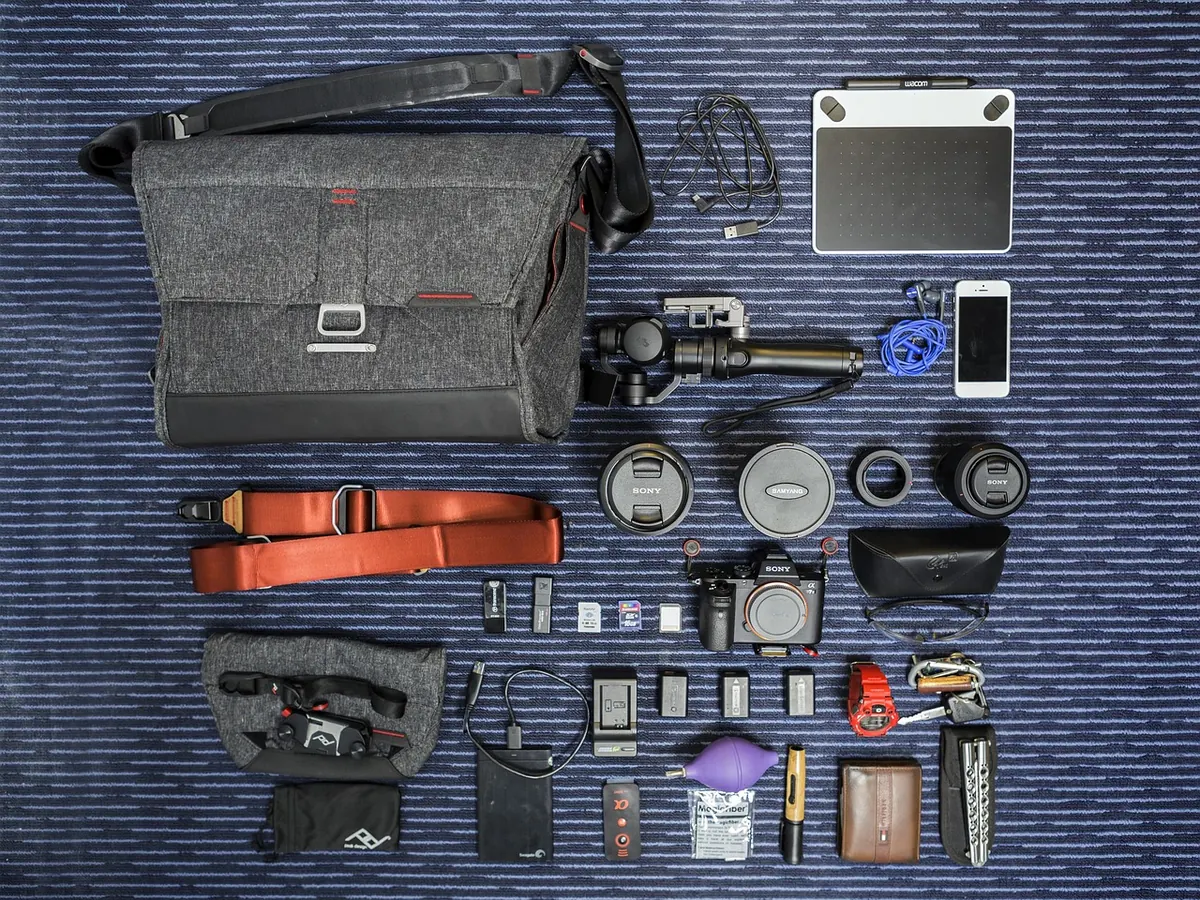
Lay everything out, then remove one item. If you cannot immediately say which photograph you would lose, remove it and leave it behind. Do this twice. Most travel kits survive the exercise with room to spare, and that room is where the rain jacket goes.
Cards and Storage: The Unglamorous Essentials
Buy several mid-sized cards rather than one enormous one. A single 256GB card that fails halfway through a trip takes everything with it; four 64GB cards spread the risk and cost roughly the same. Format each card in the camera you will shoot with, not on the computer, and label them with a marker so you can tell full from empty at a glance.
- Enough cards to cover the whole trip without deleting anything
- A small card case, kept in a different pocket from the camera
- A card reader — the one built into your laptop may be slow or missing
- A portable SSD if you shoot video or lots of raw files
- A short USB-C cable for the SSD, plus a spare
Resist the urge to reformat cards on the road to free up space. Cards are cheap; a missed afternoon is not. If you genuinely run out, buy locally and format the new card in camera.
Power: Count the Days, Then Add Two
Work out roughly how many shots you take per battery on a normal day, then multiply by the length of your trip and the number of days you will be away from a socket. For most mirrorless cameras that means three or four batteries for two weeks, more in cold weather, where cells drain noticeably faster. Charge everything the night before you fly, and charge batteries as a pair or set rather than one at a time, so you always know which are full.
- Spare batteries, charged and numbered
- Original charger plus a second one — they are small and fail quietly
- A multi-port USB charger with enough outputs for camera, phone and SSD
- Plug adapter for your destination, and a small power strip so one socket becomes four
- Power bank for long days out, charged and within your airline's carry-on rules
Lithium battery rules vary between airlines and countries, so check the limits with your carrier before you fly rather than at the gate. Keep spare batteries in carry-on luggage, with the terminals taped or in the supplied cases.
Cleaning and Weather Protection
You need less than the shops suggest. A rocket blower, a microfibre cloth, a lens pen and a few silica gel sachets will handle almost everything two weeks can throw at you. Skip wet sensor swabs unless you already know how to use them; a bad first attempt in a hotel bathroom is worse than a few dust spots you can clone out later.
For rain, a simple cover or even a clear plastic bag with a hole for the lens works fine for a few minutes of downpour. Pack a dry bag or a large zip bag for beach days — sand is more damaging than water and much harder to remove. If you are heading somewhere humid, keep the camera in its bag while it acclimatises after coming in from the cold, and let the silica do its work.
Backups: One Daily Habit
The single rule that matters: every evening, copy the day's photographs to two separate places before you format anything. That can be a laptop and an SSD, an SSD and a cloud account, or a phone and a card left untouched in the case. What it must not be is one copy, however good the card.
- Import the day's files to the laptop or tablet.
- Copy the same files to the portable SSD.
- Check the file count matches before you close the laptop.
- Leave the original files on the card until you are home.
Keep the SSD in a different bag from the camera. If the camera bag walks off, you still have the photographs — and if the SSD goes missing, the cards are still in the camera bag. That separation is the whole point.
The Printable Checklist
Copy this into a notes app or print it, and tick as you pack.
- Bodies: main camera, backup compact or phone, caps, strap, tripod plate
- Lenses: standard zoom, fast prime, optional telephoto, hoods, step-up rings, one polariser
- Storage: four or more formatted cards, card case, reader, SSD, cables
- Power: three or four charged batteries, two chargers, multi-port USB charger, plug adapter, power strip, power bank
- Cleaning: blower, cloth, lens pen, silica packs, zip bags
- Support: travel tripod with head, or a clamp and a beanbag
- Admin: insurance details, serial numbers photographed and stored on your phone, spare passport photo
The Night Before You Leave
Pack the bag, then carry it around the block. If it is uncomfortable after five minutes, it will be miserable after five hours, and you still have two weeks to go. Weigh it against whatever limit your airline enforces for cabin baggage, and shift anything heavy into a jacket pocket if you are close.
Then charge every battery, format every card in camera, sync the camera clock to local time once you land, and take one photograph of your luggage tag and your hotel address. It is a small ritual, and it means the first morning of the trip is spent shooting rather than searching for a charger.
Photo: Pexels / Pixabay